
SMS Notifications
Account and billing text notifications for SuperCognit account holders. Last updated: 18 August 2026.
This page describes the SuperCognit SMS notification program in full: who receives messages, exactly how consent is collected, what the messages contain, and how to stop them. It is published openly because the opt-in screen sits inside a logged-in account, and both carriers and prospective customers should be able to see what they would be agreeing to before creating one.
1. Program summary
| Program name | SuperCognit Account & Billing Notifications |
|---|---|
| Program operator | Ignacio Correia, Lda., trading as SuperCognit — see our Terms of Servicesection 1 |
| Who receives messages | Registered SuperCognit account holders who have opted in inside their own account. No one else. We never message a person who is not our own customer. |
| Not used for | SuperCognit customers build AI assistants that talk to their own audiences. That traffic runs on the WhatsApp Business Platform and on Telegram and never touches this program. This number carries only SuperCognit’s own account and billing notifications to its own account holders. We do not send messages on behalf of our customers, and we do not resell, share or sublicense this number or this campaign to any third party. |
| Message types | Usage-budget threshold alerts, credit top-up confirmations, billing and invoice notices, and payment-failure warnings. Transactional only — this program never carries marketing or promotional content. |
| Message frequency | Varies with your account activity. |
| Cost | SuperCognit does not charge for SMS. Message and data rates may apply, depending on your carrier and plan. |
| Is consent required? | No. SMS is optional and is never a condition of purchasing or using SuperCognit. Every one of these notifications is always also sent by email. |
| To stop | Reply STOP to any message, or remove your number in your account. |
| To get help | Reply HELP, or email support@supercognit.com |
2. How you opt in
There is exactly one way to join this program, and it is a web opt-in performed by the account holder inside their own SuperCognit account. We do not use purchased or rented lists, we do not accept consent collected by any third party, affiliate or lead generator, and there is no SMS keyword opt-in.
- Create an account at supercognit.com and sign in.
- Open the account menu and go to Profile → Notifications.
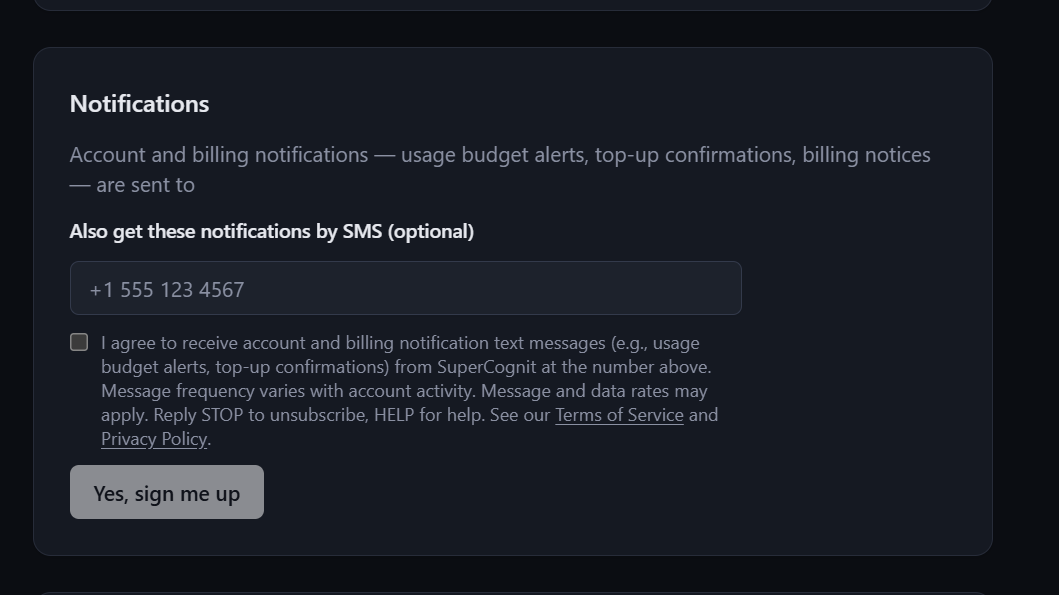
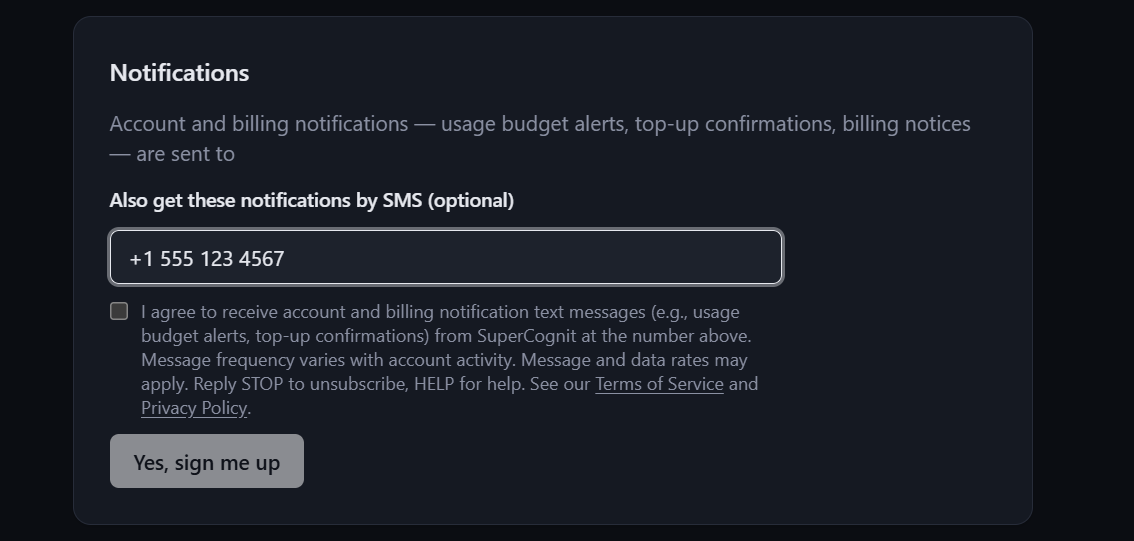
- Enter your mobile number in the field labelled “Also get these notifications by SMS (optional)”.
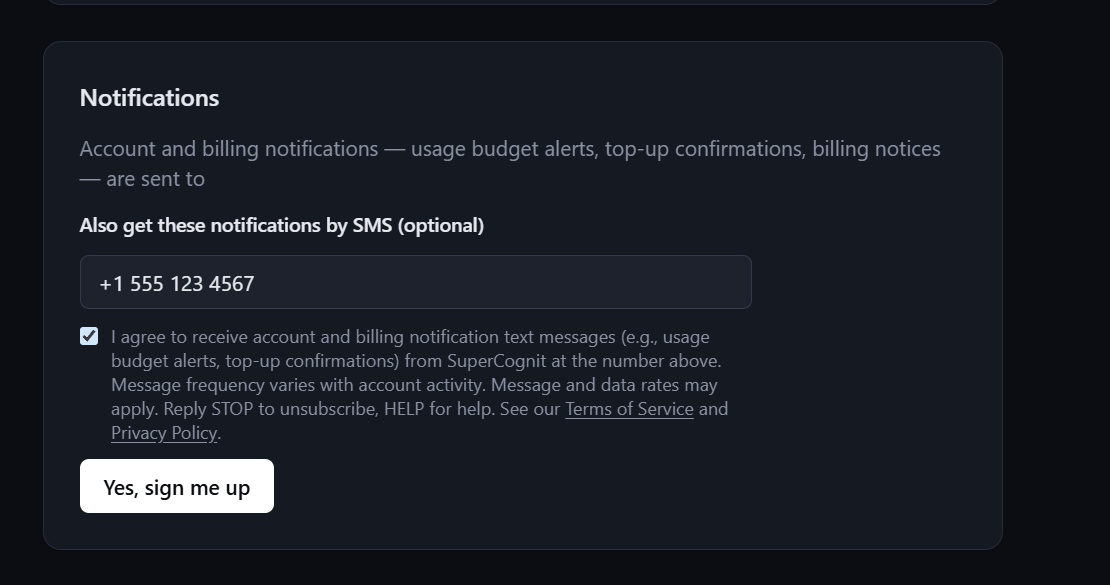
- Actively tick the consent checkbox. It is unchecked by default, and the submit button stays disabled until you tick it.
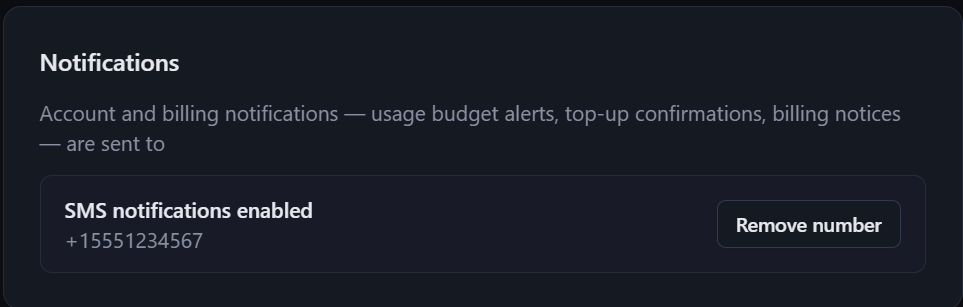
- Click “Yes, sign me up”. You receive one confirmation message.
The exact wording shown next to the checkbox
I agree to receive account and billing notification text messages (e.g., usage budget alerts, top-up confirmations) from SuperCognit at the number above. Message frequency varies with account activity. Message and data rates may apply. Reply STOP to unsubscribe, HELP for help. See our Terms of Service and Privacy Policy.
The confirmation message you receive immediately after opting in reads: “SuperCognit: You are subscribed to account and billing notifications for workspace [Workspace Name]. Message frequency varies with account activity. Message and data rates may apply. Reply HELP for help, STOP to unsubscribe.”
3. The opt-in screen
The opt-in screen is inside a logged-in account, so all four steps are reproduced here. No step is omitted and no consent wording is cropped. The only alteration is that the account holder's own email address is masked, for their privacy; the number shown is a reserved 555 test number.
4. Example messages
Values shown in [brackets] are filled in per account.
- SuperCognit: Your workspace [Workspace Name] has used [85]% of its monthly usage budget ([$42.50] of [$50.00]). Manage your limits at https://build.supercognit.com/billing - Reply HELP for help, STOP to unsubscribe.
- SuperCognit: Top-up confirmed. [$25.00] in credits was added to workspace [Workspace Name] on [12 Sep 2026]. New balance: [$31.80]. View your account at https://build.supercognit.com/billing - Reply HELP for help, STOP to unsubscribe.
- SuperCognit: Invoice [INV-2026-0148] for [$49.00] was charged to your card ending [4242] on [1 Oct 2026]. View the invoice at https://build.supercognit.com/billing - Reply HELP for help, STOP to unsubscribe.
- SuperCognit: We could not process the payment for workspace [Workspace Name]. Please update your card at https://build.supercognit.com/billing to keep your account active. Reply HELP for help, STOP to unsubscribe.
- SuperCognit: Your monthly usage budget for workspace [Workspace Name] has been reached and your workspace is paused. Top up at https://build.supercognit.com/billing to resume. Reply HELP for help, STOP to unsubscribe.
5. Stopping messages
Reply STOP, STOPALL, UNSUBSCRIBE, CANCEL, END or QUIT to any message, or remove your number under Profile → Notifications. You receive a single confirmation of the opt-out and nothing after that.
Opting out of SMS never affects your account: the same usage, billing and payment notifications continue to reach you by email. Reply START, YES or UNSTOP to resubscribe, or tick the box again in your account.
6. Getting help
Reply HELP or INFO to any message, email support@supercognit.com, or use our contact page. We reply within one business day.
7. Your data
- Mobile information is never shared or sold to third parties or lead generators for any purpose. SMS opt-in consent and phone numbers are not shared with any third party. The only party that ever receives your number is the telecommunications carrier that transmits the message, acting solely as our processor and never for any purpose of its own.
- Your mobile number is used only to deliver the account and billing notifications described on this page, and is deleted from the notification record when you remove it.
- We keep a record of your consent — the number, the moment you ticked the box and the wording you were shown — for as long as you are subscribed, so that we can evidence that consent was given. When you remove your number, that record is deleted with it.
- Full detail is in our Privacy Policy (section 6, “Service notifications”) and our Terms of Service (section 15).
8. Carriers
Carriers are not liable for delayed or undelivered messages. Delivery depends on your carrier, your device and your coverage, and no message channel is guaranteed. Never rely on SMS for anything time-critical — see section 31 of our Terms of Service regarding emergency services.
9. Contact
Ignacio Correia, Lda., trading as SuperCognit — support@supercognit.com — supercognit.com/contact. Postal address and company registration details are in section 1 of our Terms of Service.